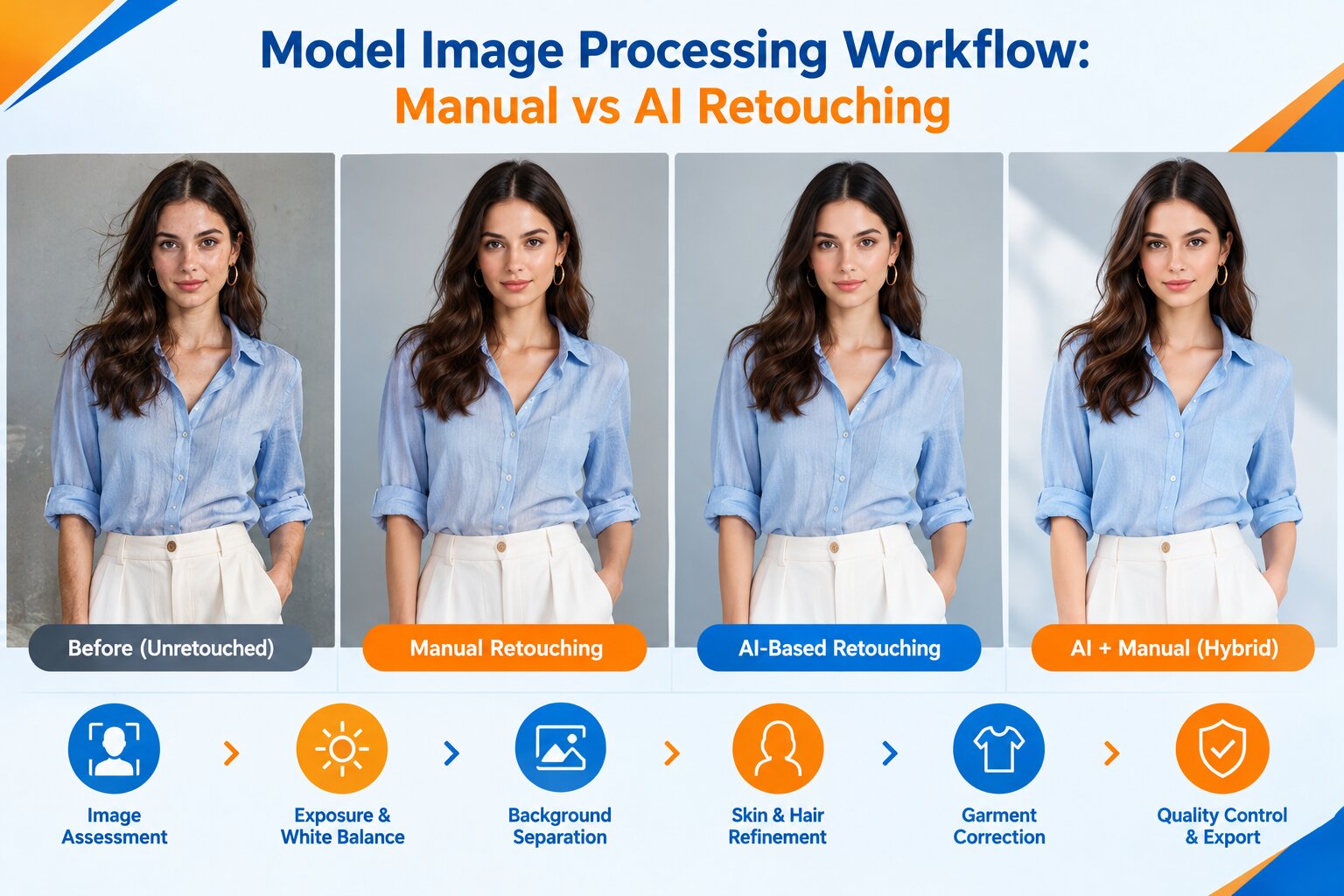
Model Image Processing Workflow: Manual vs AI Retouching
Ansu Man | Oct. 14, 2026 | Categories: Retouching | 0 comments
Model photography for fashion and e-commerce businesses has two different goals. The first is the model’s appearance. The second is the accuracy of the garment being photographed.
In images the subject may have temporary skin blemishes. The subject may have flyaways. The subject may have fabric lint. The lighting may be uneven. The background may have distracting details. The color may be inconsistent throughout the shoot.
This requires a process of retouching. The goal is to improve skin tone. The goal is to improve fabric weave. The goal is to improve stitching. The goal is to improve shape of clothing. The goal is to do all of this without ruining the skin texture.
Rather than choosing between manual editing and artificial intelligence the answer is to choose the safest edits. The answer is to choose edits that do not require an AI-aided retoucher’s judgment.
Fashion retouching guidelines advise balancing skin. Fashion retouching guidelines also advise balancing hair. Further, they advise balancing garment details and color accuracy as well.
Recent research, on clothing consistency suggests that the preservation of attributes of clothing may be necessary. The preservation of attributes of clothing may be necessary when images are edited using AI.
1. Identify Defects That Remain Without Retouching
Unretouched images may have uneven skin tones, temporary spots, stray hairs, lint, unwelcome wrinkles, background or lighting difference, and frame and frame exposure differences. In mixed lighting, color casts can appear on the face, hands, or clothing, and with reflective fabrics, highlighted areas of a garment may be missing detail.
Professional retouching separates the natural product from photographic defects. Temporary skin marks can be removed but natural pores should remain visible. Distracting fabric creases can be reduced, but construction seams, pleats, and folds that define the garment should remain. This separation prevents cosmetic cleanup from altering the real product being photographed.
2. Correct Skin and Hair Without Losing Natural Texture
Manual skin retouching allows you to change specific areas of fine lines and blemishes, transitions between skin tones, shine, and coloration. Frequency separation helps to separate general color and tone variations from individual differences, while dodge-and-burn technique selectively adjusts light and shadow. Both methods are controlled: too much smoothing can remove pores, and too much tonal adjustment can result in patchy or artificial skin.
Cleaning hair presents a different challenge, as the flyaways are often not quite as subtle as natural hair on the shoulders and on dark garments. Automatic cleaning can remove the finest hairs or leave unsightly edges. Refinement is especially valuable for the finer hairs on ears, necklines and transparent clothing in which the distinction between subject and background is more blurry.
3. Preserve Garment Color, Texture, and Construction
For brands selling online, the degree of accuracy of garments is more of a technical requirement than a stylistic feature. An incorrect white balance or saturation can alter the color of fabric. Heavy sharpening can highlight noise while tight wrinkle removal can flatten the surface of linen, cotton, wool, or knitted materials.
Begin with a neutral exposure and white balance. Then, any mishaps are cleaned up on the spot. Retouchers check stitching, buttons, zippers, printed patterns, logos, hems, and seams under high magnification. If available, compare the color of your garment to that of a different product, or for comparison when a product is listed in several colors.
4. Apply AI to Repeatable Image Corrections
AI-powered processing can help with culling, finding faces and subjects, separating the background, identifying temporary marks, adjusting the exposure, cropping and consistency of the images at batch level. These tasks can be automated if the images share the same lighting, composition, and processing requirements.
Yet, there are instances where the result can be distorted because of the presence of hair, fingers, lace, mesh, reflective items, and edges of garments. AI technology can also distort the texture of fabric, change the patterns, or even create details that were never captured in the original image. Studies have revealed garment-specific issues related to color, texture, shape, and construction in AI-generated fashion images.
The output of AI must be seen as just a suggestion.
5. Understand Where Manual and AI Workflows Differ
Manual retouching gives you direct control over individual pixels, masks, skin transitions, fabric details, and subtle color changes. It is great for transforming images of heroes, elaborate clothing, close-up portraits, or frames that require precise vision. Its only real disadvantage is the high level of skill required for performing repetitive corrections on large numbers of images.
The processing of images by AI can be repeated on hundreds of images, but it may struggle to cope with different poses, different lighting conditions, fine lines, and product details. A full-automated image processing workflow can result in a high quality image but with a subtle imperfections. Manual editing without a reference setting can result in inconsistent skin tones, exposure, or garment color in a collection.
6. Introduce Human Review as a Quality-Control Stage
Uncertainties are filtered out through automated checks, and those that are unclear must be reviewed by humans. Reviewers should check for edge halos, missing hair, distorted fingers, uneven skin texture, colors of garments, patterns, shadows, or excessive sharpening.
Quality checks should be performed on both the full image and pixel level. The full image shows problems with composition, balance, and consistency in a lookbook. High-magnification images show edge artifacts, fabric damage, mask errors, and texture loss. Comparing the edited image to the original helps to ensure that editing has not altered the character of the garment.
7. Build a Holistic AI Plus Manual Workflow
The more effective approach combines automation with targeted human intervention rather than treating the methods as competing alternatives. A practical pipeline begins with source-image assessment, exposure and white-balance correction, and batch matching. AI can then assist with background separation, initial cleanup, subject detection, and routine adjustments.
In addition to that, pictures needing extra focus are directed towards manual processing for skin retouching, hair edges, garments retouching, complex masking and color checking. The final QC stage reviews the natural skin tones, proper garment construction, lighting, background cleaning and export parameters.
Clearly defined correction criteria increase efficiency of the described approach. For instance, dust cleaning is always done automatically, but if an image shows a complex-shaped sleeve, the picture is processed manually. Images taken at the same shooting have the same color basis, while each frame is edited individually if it has different lighting or positioning.
Create a More Robust Workflow for Model Images
Model image retouching works best in cases where no visual changes reduce the level of realism or product accuracy. The original image remains imperfect, manual retouching allows for more precision, and AI is used to facilitate repetitive corrections. Holistic approach to AI and manual correction brings all these advantages along with quality checks.
If you have a fashion collection or lookbook requiring natural skin retouching, garment editing, color matching, or background retouching of model images, send us a selection of images that require these corrections. We can evaluate your model image quality needs and suggest an ideal workflow.