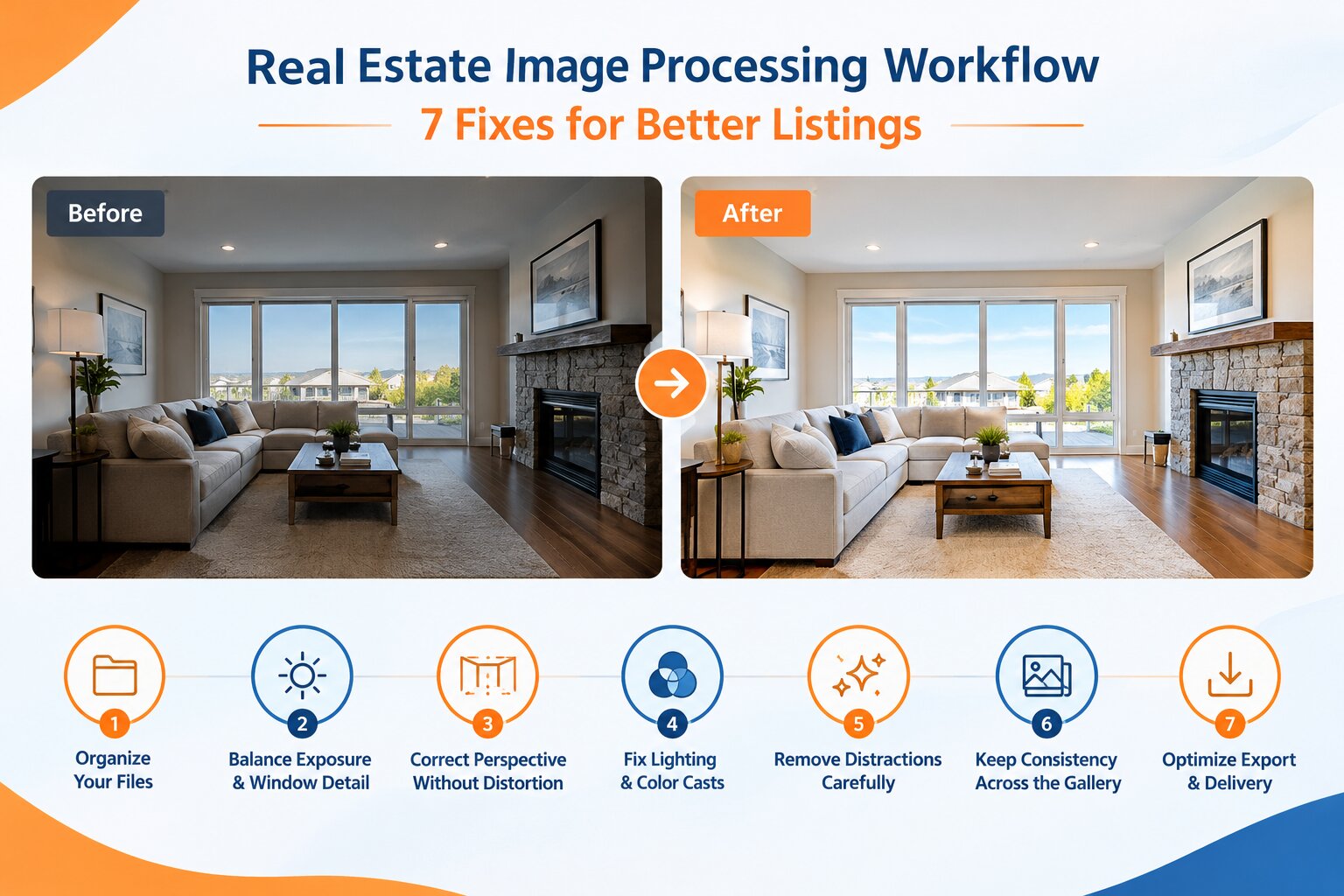
7 Real Estate Image Processing Workflow Fixes for Better Listings
Ansu Man | Oct. 21, 2026 | Categories: Retouching | 0 comments
Real estate photography needs to do more than make a property look attractive. Images must communicate room dimensions, material finishes, natural lighting, and the relationship between indoor and outdoor spaces. However, mixed lighting, bright windows, converging vertical lines, and inconsistent colors can make an otherwise professional photo set look uneven.
For real estate photographers, agencies, property portals, and listing management companies, these issues create additional editing work and can delay delivery. A structured real estate image processing workflow helps maintain visual consistency, reduce revisions, and prepare images for multiple marketing channels. Professional photo retouching adds the detailed corrections needed to achieve these results without misrepresenting the property.
1. Standardize Image Selection and File Organization
A reliable workflow begins before editing. Poor image selection wastes processing time, while inconsistent file naming makes it difficult to track revisions across large property shoots.
How to fix it
Group photographs by property ID, room, camera angle, and exposure bracket. Remove redundant frames and select images that communicate the property's layout clearly. Retain the original RAW files and group bracketed exposures together so editors can identify the correct source images.
For high-volume listing operations, a consistent folder structure and naming convention also simplify batch processing, quality checks, and client approvals.
2. Balance Interior Exposure and Window Detail
One of the most challenging problems in real estate photography is the difference between interior and exterior brightness. Exposing for a dark living room can turn the windows into featureless white areas, while exposing for the outdoor view can leave furniture and corners underexposed.
How to fix it
When multiple exposures are available, use high dynamic range (HDR) blending to combine the useful tonal information from each frame. Adjust exposure and highlights locally, preserving window frames, curtains, glass reflections, and exterior details. Carefully mask transitions to prevent bright halos, dark outlines, or pasted-looking window views.
If the original files lack essential highlight or shadow information, editing cannot reliably recover every detail. A professional retouching team should work within the available source material rather than fabricate missing property features.
3. Correct Perspective Without Distorting the Room
Wide-angle lenses and upward-tilted cameras can make walls converge, door frames lean, and furniture appear stretched. These geometric problems are especially noticeable in kitchens, bathrooms, hallways, and compact apartments.
How to fix it
Apply lens-profile corrections before adjusting perspective. Then straighten vertical architectural lines and level horizontal references where appropriate. Review the resulting crop to ensure that cabinets, doors, ceilings, and furniture retain believable proportions.
Avoid aggressive perspective correction that makes ceilings unusually tall or stretches objects near the frame edges. The objective is to improve architectural clarity while preserving the room's actual appearance.
4. Correct Mixed Lighting and Color Casts
Interior photographs often combine daylight from windows with warm ceiling lights and cooler LED illumination. These different light sources can produce yellow walls, greenish shadows, or blue highlights. When images are edited independently, the same property may appear to have different wall or flooring colors from one photograph to another.
How to fix it
Establish a consistent white balance using neutral reference areas, then apply localized color corrections to areas affected by mixed illumination. Preserve the natural warmth of wood, the actual color of paint, and the appearance of stone, tiles, and countertops.
Compare images side by side before delivery. Professional retouching can create a cohesive color profile across the listing while maintaining differences caused by genuine lighting conditions.
5. Remove Temporary Distractions Carefully
Small distractions can compete with the property's main selling points. Sensor dust, minor marks, stray cables, temporary cleaning supplies, and unwanted reflections may draw attention away from the room.
How to fix it
Use targeted retouching to remove minor distractions while preserving natural textures, surface edges, and lighting. Inspect reflective materials such as glass, polished stone, and stainless steel carefully because careless corrections can produce repeated patterns or inconsistent reflections.
Distinguish temporary photographic distractions from permanent property features. Structural damage, fixed installations, and material defects should not be removed in ways that mislead prospective buyers. Any substantial alteration or virtual staging should follow the listing platform's disclosure requirements and the client's instructions.
6. Maintain Consistency Across the Entire Listing
A property gallery is usually viewed as a sequence, not as a collection of unrelated photographs. Differences in brightness, contrast, saturation, sharpness, and cropping can make the gallery feel disjointed, even when individual images look acceptable.
How to fix it
Create a reference edit for each lighting condition, such as daylight interiors, darker rooms, exteriors, and twilight photographs. Apply suitable baseline adjustments to similar images, then refine each photograph individually. Check shadow noise, highlight clipping, sharpening halos, and color shifts at full resolution.
A two-stage quality check is useful for high-volume workflows. The first review checks technical defects in individual images; the second evaluates the complete gallery for visual consistency and property accuracy.
7. Optimize Export Settings and Delivery
Even well-retouched photographs can lose quality when exported incorrectly. Excessive compression creates artifacts around architectural edges, while unsuitable dimensions or color profiles can affect display across listing portals, websites, and marketing materials.
How to fix it
Define export presets for each delivery channel. Confirm pixel dimensions, JPEG quality, sRGB color space for typical web use, orientation, and file naming. Follow the receiving platform's current image specifications rather than assuming that one export setting works everywhere.
Before delivery, verify that files open correctly, the final count matches the approved selection, and no unapproved edits or temporary files are included. A predictable delivery process reduces rework for photographers and listing teams.
Build a More Reliable Property Image Workflow
A professional real estate image processing workflow combines organized source files, controlled exposure blending, accurate perspective correction, natural color grading, careful retouching, and consistent export settings. Each stage addresses a specific production problem, but the greatest benefit comes from applying the same quality standards across the entire property gallery.
For photographers, real estate agencies, and property marketing businesses managing multiple listings, outsourcing detailed editing can help control production workloads while maintaining consistent presentation. The key is to work with a retouching partner that understands architectural geometry, mixed lighting, material accuracy, and listing-specific delivery requirements.
Need Consistent, Listing-Ready Property Images?
Partner with PicsRetouch for professional real estate photo retouching tailored to your workflow. From HDR blending and window detail recovery to perspective correction, color balancing, and distraction removal, our team can help prepare property images for professional presentation.
Share a sample set of your property photographs to discuss your editing requirements, turnaround expectations, and quality standards. Request a free sample edit and evaluate the results before moving forward with a larger project.